
The MYOB Acumatica interface is changing.
Classic UI is being retired as part of the 26R2 release. Modern UI, introduced in 25R2, is now the direction of the platform. From this point forward, new features are being built for Modern UI.
For MYOB Acumatica users, this is more than a visual update. It changes how screens are used, how users move through workflows, and how some customisations need to be reviewed.
This guide explains what is changing, who is affected, what needs to be checked, and how to prepare your business before the 26R2 deadline.
Key dates and facts at a glance
- 25R2 (now): Modern UI is production-ready and available now. Classic UI continues to run in parallel during the transition.
- 26R2 (deadline): Classic UI is retired. All users must be on Modern UI. There is no opt-out.
- Performance: Modern UI is up to 30% faster than Classic UI in common transaction workflows.
- New features: All new MYOB Acumatica features from 25R2 forward are built for Modern UI only.
- Customisations: Existing customisations need to be reviewed, converted where required, and tested before production use.
- Sandbox testing: SaaS customers receive a complimentary 90-day sandbox. Custom screens, integrations, ISV add-ons and workflows should be validated in sandbox before going live.
- Payroll: Payroll screens remain in Classic UI in 25R2. Modern UI payroll is expected in a future release.
Why This Change Matters
For many MYOB Acumatica users, the interface is not just a screen. It is where quotes are entered, purchase orders are approved, inventory is checked, invoices are processed, and reports are reviewed.
That means even small interface changes can affect daily work.
A faster screen may save time. A cleaner layout may reduce confusion. But a changed button, hidden field, or different workflow can slow people down if it is not tested before go-live.
The bigger issue is future readiness. Classic UI is not the long-term path. If your business stays on Classic UI for too long, you risk falling behind on new features, AI capability, interface improvements, and supportability.
The safest approach is to use the transition window properly. Review your environment now. Test in sandbox. Pilot with a small user group. Resolve issues before the deadline gets close.
What the MYOB Acumatica Modern UI Delivers
Modern UI is not just about making the system look newer. The main value is in speed, usability, and preparing the platform for future capability.
Faster day-to-day workflows
Modern UI is designed to improve performance across common tasks. In standard areas, users can expect faster page loads, cleaner navigation, and less waiting between screens.
This matters most for high-volume teams such as finance, purchasing, inventory, warehouse, payroll, and customer service. If a user completes the same action many times each day, even small improvements can save time.
Cleaner screen layouts
Modern UI uses a cleaner screen structure. Information is grouped more clearly, sections are easier to scan, and unnecessary clutter is reduced.
For new users, this makes the system easier to learn. For experienced users, it can make daily work easier to follow without relying as much on workarounds.
Responsive access across devices
Modern UI is built to work across different screen sizes. A user may need to review data from a laptop on site, a tablet in the field, or a smaller screen while away from the office. For businesses with warehouse, field, project or mobile teams, this is a functional improvement, not just a cosmetic one.
More personalised user experience
Modern UI gives users and administrators more control over how screens are arranged. Users can surface the fields they need, hide what they do not use, and adjust layouts to match their workflow.
This helps reduce screen clutter and makes each role’s workspace more relevant.
A stronger foundation for AI and future features
This is the most important long-term point. New MYOB Acumatica features are being built for Modern UI.
That includes AI Studio, the AI-powered agent builder, and other future platform capabilities. Businesses that delay the transition may find a growing gap between what they use and what the platform can support.
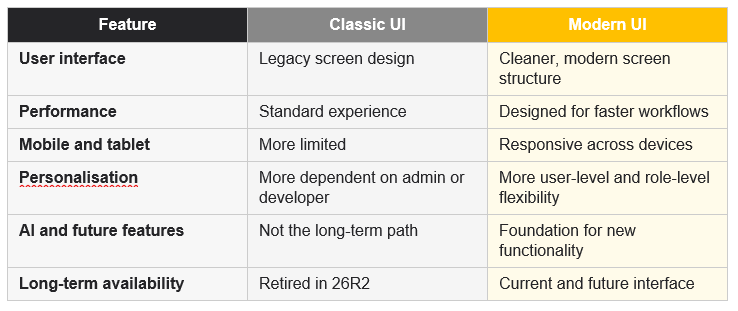
Classic UI vs Modern UI
Here is a simple way to understand the shift. Classic UI is the legacy interface that has supported users for years but is no longer the focus of future development. Modern UI is the current direction, designed for cleaner workflows, responsive use, easier personalisation and future platform features.
Who Is Affected by the Modern UI Transition?
Every MYOB Acumatica customer needs to prepare for this change. The level of work depends on how your system is configured, how many users you have, and how much customisation exists in your environment.
Some teams may only need training and testing. Others may need a deeper review of custom screens, workflows, reports, dashboards, and integrations.
End users
End users will notice changes to screen layouts, navigation, field placement, and day-to-day workflows.
Most users will adapt quickly if they are trained before the change. The risk comes from moving too late, with no time to explain what has changed.
Users do not need to know every technical detail. They need to know what looks different, where key actions now sit, and how to complete their usual tasks.
Finance teams
Finance teams often work across invoices, payments, approvals, reporting, customer records, vendor records, and month-end tasks.
For these users, the benefit is not only a cleaner interface. It is the chance to reduce screen clutter and make daily finance work easier to complete.
The risk is disruption during close periods, payment runs, or reporting deadlines. Finance teams should test their regular workflows early, especially month-end, approval, reconciliation, and reporting processes.
Operations teams
Operations teams may use MYOB Acumatica for sales orders, purchase orders, inventory, projects, field work or job-related workflows. These teams should test the actual screens they use every day. Do not assume a screen is ready because the login page looks fine. The real test is whether users can complete their normal process without errors, missing fields, broken buttons or confusing layout changes.
Payroll users
Payroll screens remain in Classic UI in 25R2. Payroll teams can continue using Classic UI for now.
However, administrators should still include payroll in the broader Modern UI transition plan. Payroll teams need to understand what is changing, which areas are staying the same for now, and how this may affect their work later.
This is also a separate issue from payroll-related compliance changes. For Australian employers, Payday Super becomes a major compliance change from 1 July 2026. Payroll teams may need to manage more than one change program across the same period.
System administrators
System administrators have one of the most important roles in the transition. They need to audit existing customisations, check which screens are Modern UI ready, confirm ISV compatibility, prepare sandbox testing, plan pilot users, communicate changes to teams, and coordinate fixes with their implementation partner. The workload is manageable when it starts early. It becomes much harder when it is left until the 26R2 deadline is close.
Developers and implementation partners
Custom screens and UI-specific customisations need careful review. Some business logic may continue to work without major changes. But anything that affects screen layout, buttons, fields, workflows or user interaction needs to be checked and tested. The conversion tool can help, but it should not be treated as a full replacement for review and quality assurance.
What Happens to Your Customisations?
This is where most businesses need the most planning.
Many MYOB Acumatica customers have customisations. Some are small, such as user-defined fields or adjusted layouts. Others are central to how the business operates, such as custom screens, workflow changes, integrations, reports, and dashboards.
Modern UI does not mean every customisation will fail. But it does mean every important customisation should be reviewed and tested before production use.
The more customised your environment is, the earlier you should start.
Standard screens
MYOB is rebuilding standard screens for Modern UI as part of the release cycle. If your business only uses standard screens with limited configuration, the transition may be simpler. You still need testing, but the risk is lower.
User-defined fields
User-defined fields may be easier to manage in Modern UI, but they still need review. Check whether key fields appear in the right place, behave correctly and support the workflow users expect.
Custom screens
Custom screens built for Classic UI may need to be reviewed, converted, or tested in Modern UI.
The conversion tool can help, but complex screens often need manual work. This is especially true when screens include custom buttons, unusual parameters, role-specific layouts, advanced logic, or workflow-specific behaviour.
Do not assume a custom screen is safe because it opens in Modern UI. Test the full process from the user’s point of view.
Extensions and workflow changes
Extensions that affect business logic may still work, but they should be tested against the Modern UI screen experience.
Do not only check whether the system saves a transaction. Test the full workflow from the user’s perspective.
Ask:
- Can the user find the field?
- Does the button appear where expected?
- Does the workflow still make sense?
- Are approvals, notifications, and reports still triggered correctly?
- Can the user complete the task without manual workarounds?
Third-party ISV products
If your MYOB Acumatica environment uses third-party add-ons, check compatibility before migrating related screens. Some ISV products may already support Modern UI. Others may still be in progress.
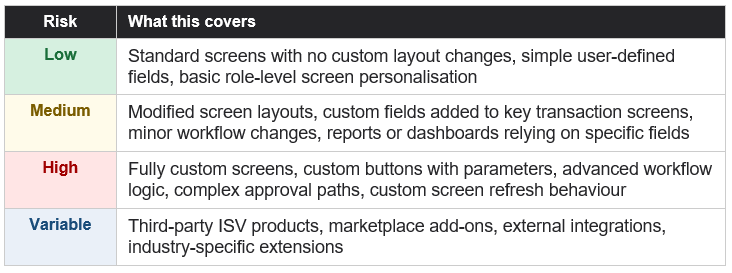
Customisation Risk Matrix
Use this as a starting point when reviewing your MYOB Acumatica environment. This is a guide only. The real risk depends on how each screen was built and how important it is to daily operations.
Why Sandbox Testing Is Not Optional
Do not move production users to Modern UI until you have tested your environment in sandbox.
Sandbox testing gives your team a safe place to check custom screens, transaction workflows, approvals, reports, dashboards, integrations, ISV add-ons, user-defined fields, role-based access, and mobile layouts before any production users are affected.
Issues found in sandbox are manageable. Issues found in production can slow down processing, delay approvals, affect reporting, and create avoidable support pressure.
Use the sandbox to answer three questions:
- What works as expected?
- What needs adjustment?
- What needs training before rollout?
Sandbox testing gives your team a safe place to check custom screens, transaction workflows, approvals, reports, dashboards, integrations, ISV add-ons, user-defined fields, role-based access and mobile and tablet layouts before any production user is affected.
Need help reviewing your MYOB Acumatica environment?
How the Transition Works in 25R2
The transition does not need to happen in one step. In 25R2, Classic UI and Modern UI can run in parallel. This gives businesses a practical window to test, train, and migrate in stages.
You can move by screen. Some screens can be enabled in Modern UI while others remain in Classic UI.
You can move by user. A pilot group can start using Modern UI while other teams stay on Classic UI.
You can move by department. Finance, operations, projects, and admin teams can be migrated in stages based on readiness.
The risk is waiting too long. If the migration is delayed until 26R2 is close, there may be less time for testing, training, vendor coordination, and customisation work.
What Happens If You Delay?
Delaying the migration does not remove the work. It compresses it.
If you start early, your business has time to:
- Review customisations
- Check ISV compatibility
- Test screens in sandbox
- Train users
- Pilot with a small group
- Fix issues before production rollout
- Move teams in stages
If you wait until the deadline is close, your business may face:
- A shorter testing window
- More pressure on administrators
- Higher risk of rushed customisation work
- Less time for user training
- More disruption if issues appear late
- Harder coordination with vendors and partners
The earlier you start, the more controlled the transition will be.
Frequently Asked Questions
Can I keep using Classic UI after 25R2?
Yes. Classic UI can still be used during the transition period.
However, Classic UI is being retired in 26R2. Businesses should use the 25R2 to 26R2 window to review, test, and migrate before the change becomes mandatory.
What happens if we do nothing before 26R2?
If you do nothing, you may face a rushed migration later. That can increase the risk of missed customisations, untested workflows, user confusion, ISV compatibility issues and avoidable disruption. The planning work does not disappear. It just becomes more urgent.
Do we have to migrate all screens at once?
No. The transition can be handled screen by screen, user by user or team by team. This is the recommended approach for businesses with customisations or complex workflows.
What happens to our customisations?
Customisations need to be reviewed. Some may work with little change. Others may need conversion and manual refinement. Any UI-specific customisation should be tested in sandbox before production use.
Will third-party add-ons work in Modern UI?
It depends on the product. Some ISV products may already support Modern UI. Others may still need updates. Check the MYOB Marketplace and confirm directly with each vendor before migrating screens that rely on their product.
Does Modern UI affect our data?
Modern UI is an interface change. It should not change your records, transactions, or history.
However, screen changes can affect how users enter, review, and process information. That is why testing matters. Your team needs to confirm that key workflows still work correctly before moving production users across.
What about payroll?
Payroll screens remain in Classic UI in 25R2. Administrators should handle payroll separately from the main Modern UI migration plan. Australian employers should also be aware that Payday Super changes take effect from 1 July 2026, which may affect the same payroll and finance teams preparing for the system transition.
Where can I find the full technical release notes?
The full technical release notes for 25R2 are published at our blog post: MYOB Acumatica 25R2: Complete Guide to New Features, AI and Payday Super . These cover all configuration and behavioural changes in detail and are the reference document for system administrators and implementation teams.