Every EOFY has payroll, tax, and reporting deadlines. EOFY 2026 has an extra layer because Payday Super starts the day after the financial year ends.
From 1 July 2026, employers will need to pay super at the same time as salary and wages. That change sits alongside STP finalisation, asset purchase deadlines, Q4 super timing, BAS preparation, and year-end close tasks.
For businesses using MYOB Acumatica, this is not just a compliance checklist. It is also a system readiness check. Payroll settings, STP reporting, super payments, employee data, clearing house arrangements, and finance module close processes all need to be reviewed before the deadline arrives.
Use this checklist to prepare early and reduce last-minute EOFY pressure.
1. Payday Super starts on 1 July 2026
Payday Super starts from 1 July 2026. Employers will move from paying super quarterly to paying super at the same time as salary and wages. Super contributions must reach the employee’s super fund within seven business days after payday.
This is one of the biggest payroll changes Australian employers have had to prepare for in years. It affects payroll timing, super calculations, employee data, clearing house setup, and internal review processes.
Do not treat this as a simple date change. If your payroll data, super fund details, or payment process is not ready, each pay run can create compliance risk.
What this means in practice
- Weekly payroll can mean up to 52 super payment cycles per year instead of four.
- Super will be calculated on Qualifying Earnings instead of the current Ordinary Time Earnings base.
- Employee super fund details need to be accurate before each pay run.
- Payroll teams need to check how super payments are submitted and reconciled.
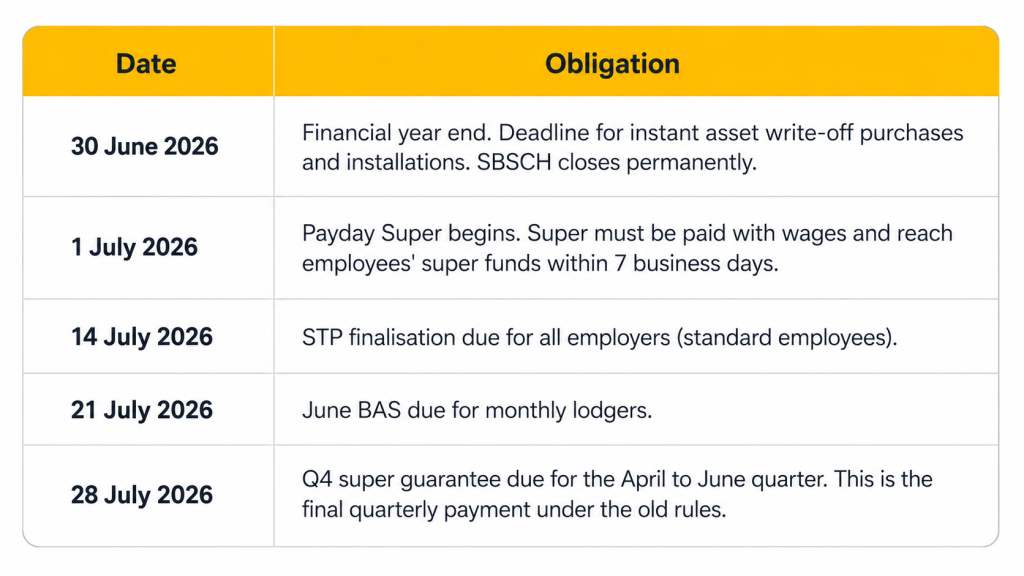
- The Small Business Superannuation Clearing House will no longer be available after 30 June 2026 for existing users.
MYOB Acumatica readiness note
For businesses using MYOB Acumatica, this needs to be reviewed before your first July 2026 pay run.
Check your payroll version, STP setup, super configuration, employee fund details, clearing house process, pay calendar, and reporting workflow. If your system has not been reviewed, book time with AlphaBiz before EOFY.
Full ATO guidance on Payday Super: ato.gov.au/businesses-and-organisations/super-for-employers/payday-super
2. STP Finalisation is due 14 July 2026
Single Touch Payroll finalisation is generally due by 14 July each year. Employers need to make a finalisation declaration so employees can access their finalised income information for their tax return.
Some payee arrangements may have different timing, including closely held payees. Confirm your reporting position before finalising.
Missing the deadline can delay employee tax returns, create employee queries, and increase the risk of ATO follow-up if payroll records do not match what has been reported.
Before you submit STP Finalisation
- Verify employee names, TFNs, ABNs, addresses, and contact details.
- Run the ATO validation check.
- Confirm Reportable Fringe Benefits amounts have been entered correctly.
- Reconcile payroll totals against your general ledger.
- Review superannuation data against payroll and payment records.
- Check terminated employees have been finalised correctly.
- Preview the STP finalisation report before submission.
In MYOB Acumatica, go to Payroll, then Single Touch Payroll, then STP Finalise. Select the financial year, tick the employees you need to finalise, and use the preview option before submitting.
3. Instant Asset Write-Off: the 30 June threshold
For the 2025-26 financial year, eligible businesses can immediately deduct the business portion of eligible assets costing less than $20,000. The asset must be first used or installed ready for use by 30 June 2026.
The $20,000 threshold applies per asset, not to your total asset purchases for the year. Assets costing $20,000 or more cannot be immediately deducted under this measure and must be depreciated through the small business pool.
What to confirm before 30 June
- The asset has been received and installed, not just ordered or invoiced.
- The asset is ready for business use by 30 June 2026.
- The asset is used in the business, not held as trading stock.
- The business meets the aggregated turnover test.
- The purchase record is complete and available for your accountant.
Assets costing $20,000 or more cannot be immediately deducted under this measure and must be depreciated through the small business pool.
What to confirm before 30 June
- Any asset you intend to claim must be physically received and installed, not just ordered or invoiced, by 30 June 2026
- Assets must be used in the business, not held as trading stock
- If you are close to the threshold, confirm the exact cost with your accountant before assuming eligibility
Note: Do not assume the same rule will apply after 30 June 2026. If you are planning asset purchases near EOFY, confirm timing and eligibility with your accountant before committing.
4. Close your modules in the right sequence
For businesses using MYOB Acumatica, the order of financial module close matters. Closing modules out of sequence can create reconciliation issues that take time to unwind.
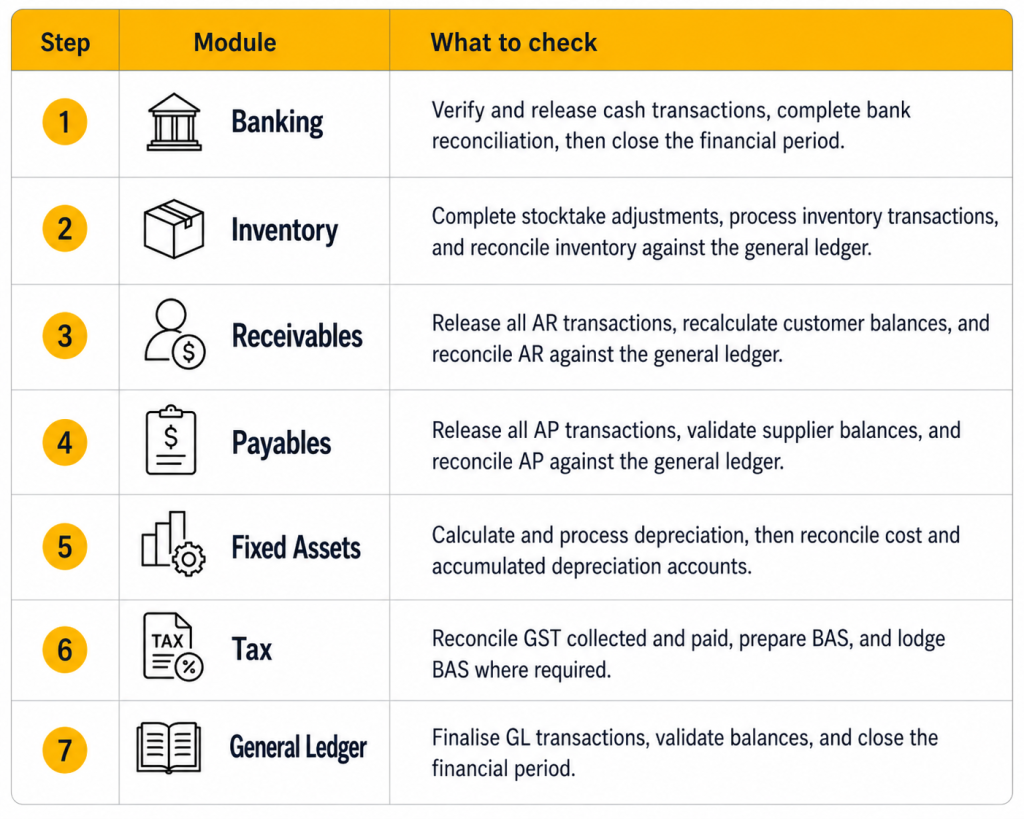
Do not close the General Ledger until the other modules are closed and reconciled. Reopening a closed period after other modules have moved forward can create avoidable reconciliation work.
5. Check your Q4 superannuation timing
The final quarterly super guarantee payment under the current quarterly system covers April to June 2026. The ATO lists the Q4 super payment due date as 28 July 2026.
This creates a timing overlap. The final quarterly payment for April to June is still due after Payday Super starts on 1 July 2026.
Two deadlines to manage
- 28 July 2026: Q4 super guarantee payment due for the April to June quarter.
- From 1 July 2026: Payday Super applies to new qualifying earnings from July pay runs.
If your payroll runs weekly, fortnightly, or monthly, review your June cut-off carefully. Confirm which pay runs fall under the final quarterly system and which pay runs fall under Payday Super.
This is especially important for businesses with late-June pay runs, back pay, commissions, bonuses, or payroll corrections.
Two deadlines to manage simultaneously
- 28 July 2026: Q4 SGC due for the April-June quarter (final quarterly payment)
- From 1 July 2026 onward: Payday Super obligations begin for all employers
If your payroll runs fortnightly or monthly, you may have pay runs in late June that generate super obligations under the new Payday Super rules from 1 July. Plan your June payroll cut-off carefully so you know exactly which pay runs fall under the old quarterly system and which fall under Payday Super.
Key Dates Summary
EOFY 2026 Readiness Checklist
Use this checklist before EOFY to confirm your payroll, super, STP, asset, BAS, and MYOB Acumatica year-end close tasks are ready.
Where possible, complete these checks before the final week of June. This gives your team time to fix missing data, confirm system settings, and resolve reconciliation issues before the deadline.
Payroll and super
- Confirm MYOB Acumatica is on a supported version for Payday Super preparation.
- Review payroll calendars for June and July.
- Check employee super fund details.
- Confirm your clearing house or SuperStream payment method.
- Review super calculations and payroll categories.
- Confirm Payday Super process ownership.
- Identify any late-June pay runs, bonuses, commissions, or adjustments.
STP and employee data
- Verify employee names, TFNs, ABNs, and contact details.
- Check Reportable Fringe Benefits amounts.
- Reconcile payroll totals to the general ledger.
- Preview STP finalisation data.
- Submit STP finalisation by 14 July where required.
Finance and year-end close
- Reconcile bank accounts.
- Reconcile AR and AP balances.
- Complete inventory stocktake adjustments.
- Process fixed asset depreciation.
- Prepare BAS and GST reconciliation.
- Close modules in the correct sequence.
- Save EOFY reports for audit and internal review.
Frequently Asked Questions
When does Payday Super actually start?
1 July 2026 for all Australian employers. There are no exemptions based on business size, though the ATO has signalled a risk-based compliance approach for genuine errors in the first year of transition. See the ATO’s Payday Super overview for more detail.
What happens if I miss the STP Finalisation deadline?
There is no direct financial penalty for missing 14 July, but employees cannot complete their tax returns until their income statement is marked as Tax Ready. The ATO may follow up for an explanation if you are significantly late.
Does the $20,000 instant asset write-off apply to assets purchased but not yet received by 30 June?
No. The asset must be first used or installed ready for use by 30 June 2026 to be eligible. Purchasing or ordering before 30 June is not sufficient.
Our business uses the SBSCH. What do we do?
The SBSCH closes permanently on 30 June 2026. You will need to use an alternative SuperStream-compliant clearing house from 1 July. MYOB Pay Super is a free integrated option available within MYOB Acumatica Payroll. Contact AlphaBiz to set it up before the deadline.
Does Payday Super change how super is calculated?
Yes. The calculation base changes from Ordinary Time Earnings (OTE) to the new Qualifying Earnings (QE) definition. QE is broader than OTE for most pay items. You will need to review your pay items in the Pay Item Liabilities screen in MYOB Acumatica and flag them accordingly. The ATO has published a qualifying earnings fact sheet with specific examples.
What are employers’ obligations under Fair Work when it comes to payroll?
Employers must meet minimum pay rates, entitlements and record-keeping obligations under the Fair Work Act. Fair Work Australia’s employer resources cover pay slips, record-keeping and what to do if you make a payroll error
Where this leaves your business
EOFY 2026 is not just another year-end close.
Payday Super changes how often super is paid. STP finalisation still needs to be completed on time. Asset purchases need to be checked before 30 June. Q4 super still needs to be managed under the current quarterly rules. Finance teams also need to close modules in the right sequence.
The risk is not one large issue. It is several small issues happening at the same time.
If your business uses MYOB Acumatica, the best step is to review your setup before EOFY pressure builds.
AlphaBiz can help you check your payroll settings, STP setup, super configuration, clearing house process, module close sequence, and EOFY readiness.
This article is general information only and is not financial, tax or legal advice. Rules and thresholds referenced here are current as at 18 June 2026 and may be subject to change. Speak with the ATO or your accountant about how these changes apply to your specific business.
Written by the AlphaBiz Solutions team. AlphaBiz Solutions is a certified MYOB Acumatica implementation partner based in Perth and Sydney, working with mid-market Australian businesses since 2009.