
Why this release matters
MYOB Acumatica 25R2 is not just another software update. It introduces Australia’s most significant payroll compliance change in years with Payday Super, begins the permanent transition away from Classic UI, and lays the foundation for AI-powered business processes through AI Studio. For most mid-market businesses, these three changes alone will influence payroll operations, user adoption and systems strategy over the next 12 to 24 months. Understanding them now puts your business in a stronger position than waiting until the pressure is on.
MYOB Acumatica 25R2 is the most significant release in recent years. It touches every part of the platform, from the way the interface looks and feels, to AI agents you can build without a developer, to compliance changes that affect every Australian employer from 1 July 2026.
This article is a complete walkthrough of every feature and enhancement across all capability areas: Platform, People and Payroll, Finance, Sales and Customer, Supply Chain, Production, Projects and Field Services. It is written for business owners, directors, finance managers, operations managers and IT leads at mid-market Australian businesses.
What is covered in 25R2
- Platform: Modern UI overhaul, AI Studio (Technology Preview), Business Events improvements, colour-coded record status
- People and Payroll: Payday Super compliance, New Clock App, Workforce Management benefits via Flare
- Finance: Inclusive tax support for Avalara and Vertex, redesigned ARM report builder
- Sales and Customer: Redesigned CRM tasks, vendor support cases, bulk document emailing
- Supply Chain: AI-powered Cross-Sell Assistant, Order Orchestration, Directed Put-Away, intercompany drop shipments
- Production: AI production variance anomaly detection, new Production Order View, BOM cost rollup improvements, lot and serial attribute capture
- Projects: Closed project status, predefined user roles, mobile change orders and approvals, document management, one-click transaction reversal
- Field Services: Fully rebuilt Modern Calendar Board with optional Azure Maps integration and GPS tracking
1. Platform
wThe biggest architectural change to MYOB Acumatica in a decade sits inside this release. The Platform updates affect every user, every day, not as a switch that gets flipped, but as a transition path your team can move through at a pace that suits your business.
Modern UI
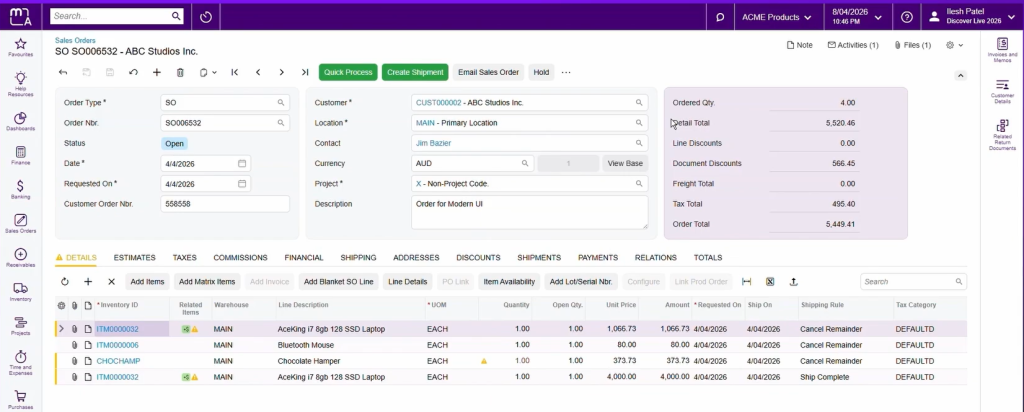
The Modern UI is a complete rebuild of the MYOB Acumatica interface. It is up to 30% faster than the Classic UI, which translates to roughly nine seconds saved on a typical two-line sales order entry. Across a full day of transactional work, that saving adds up significantly.
The new interface is cleaner and less cluttered, with collapsible sections, smarter grouping and a responsive layout that works properly across desktop and mobile devices. Users can reorder tabs, hide what they do not need, and surface user-defined fields in the exact workflow context where they are relevant, without needing developer support.
The transition path matters: Classic UI and Modern UI run in parallel in 25R2, so teams can adopt screen by screen. Classic UI will be fully retired in the 26R2 release. All new features from this release forward are built exclusively in Modern UI, which means staying on Classic UI means missing future functionality.
Payroll screens: Payroll remains in Classic UI in 25R2. Modern UI payroll is coming in a future release.
Customisations: Existing customisations need to be reviewed, converted and tested in a sandbox environment before switching. If your business has significant customisations, speak to your implementation partner about a transition plan.
Business Impact
For a finance or operations team processing 100 or more transactions per day, a 30% improvement in screen speed can save hours of administrative effort across the month. Multiply that across a team and the productivity case for migrating early is clear. For businesses with field staff or remote teams, the responsive design means the same system works properly on any device without workarounds.
AI Studio (Technology Preview)
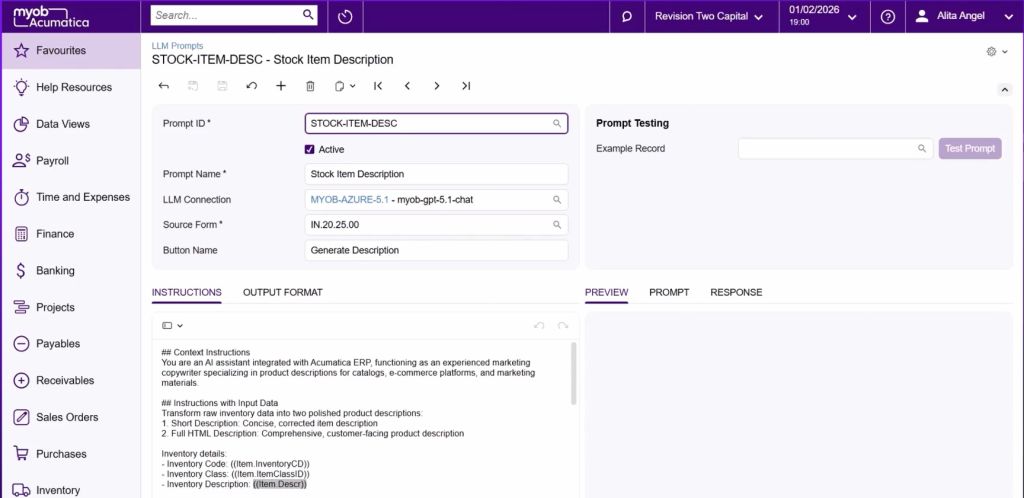
AI Studio is MYOB Acumatica’s flagship new AI capability. It lets businesses build their own AI-powered agents directly inside MYOB Acumatica using their own business data, without writing a single line of code.
The distinction from existing AI features like AP bill entry automation or expense capture is important: AI Studio agents act on work, not just answer questions. You describe what you want in plain language, and the agent executes against your live ERP data within your existing role-based security controls.
Use cases demonstrated at the 25R2 launch include generating product descriptions, drafting customer service responses from case history and creating supplier summaries. The scope of what you can build will grow as the technology matures.
Data sovereignty: AI Studio is powered by Anthropic via AWS Bedrock, hosted in local Australian and New Zealand data centres. Data never crosses a border and is never used to train external AI models. Businesses with a preferred AI provider can also connect their own.
Availability: Technology Preview in 25R2. Full availability in 26R1. Register for the tech preview via the Release Hub.
Business Impact
Automated business event emails can now be reviewed and edited before they are sent. If an automated communication fails partway through, it can be resumed from where it stopped rather than restarted entirely. This reduces rework, improves the reliability of automated outbound communications and gives administrators more confidence in the events workflow.
Business Event Improvements
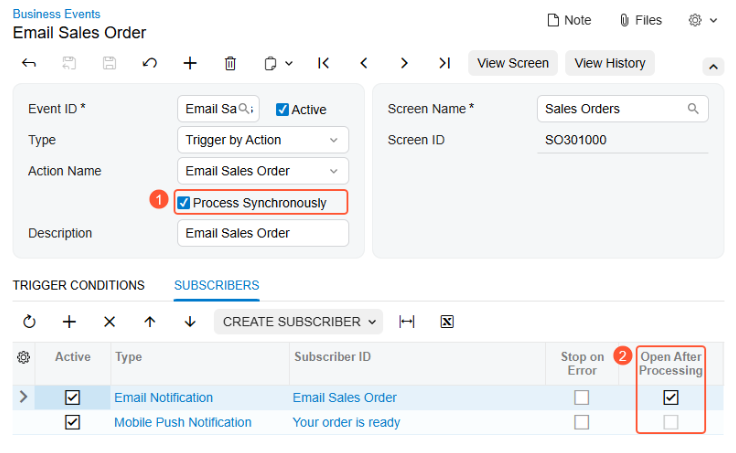
Automated business event emails can now be reviewed and edited before they are sent. If an automated communication fails partway through, it can be resumed from where it stopped rather than restarted entirely. This reduces rework, improves the reliability of automated outbound communications and gives administrators more confidence in the events workflow.
Colour-Coded Record Status
Record status across key forms including sales orders, purchase orders, invoices, projects and payroll documents is now visually colour-coded. In high-volume workflows, this makes it faster to identify what needs attention, what is in progress and what is complete without reading every status label individually.
New Aggregate Function for Generic Inquiries
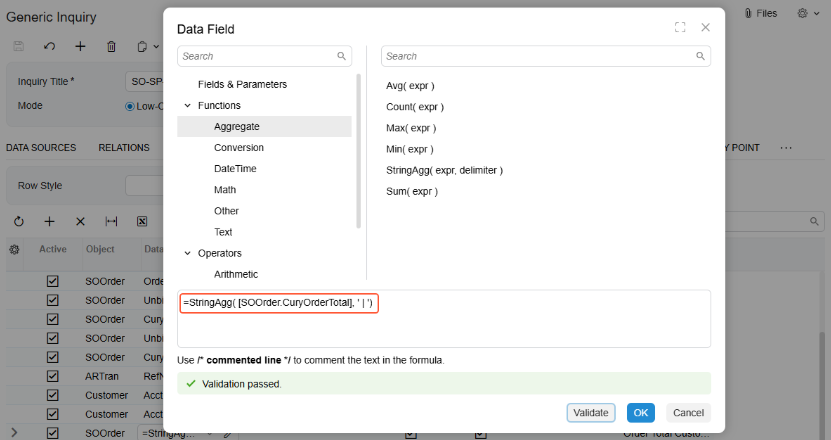
Multiple related record values can now be consolidated into a single readable field within Generic Inquiries. Previously, this required multiple rows or an export to Excel. The result is cleaner data views, less manual analysis work and faster decision-making for report builders and analysts.
2. People and Payroll
The People and Payroll updates in 25R2 are dominated by one non-negotiable compliance change: Payday Super. Alongside it, two new features improve time capture and employee experience for workforce-intensive businesses.
Payday Super (Australian customers)
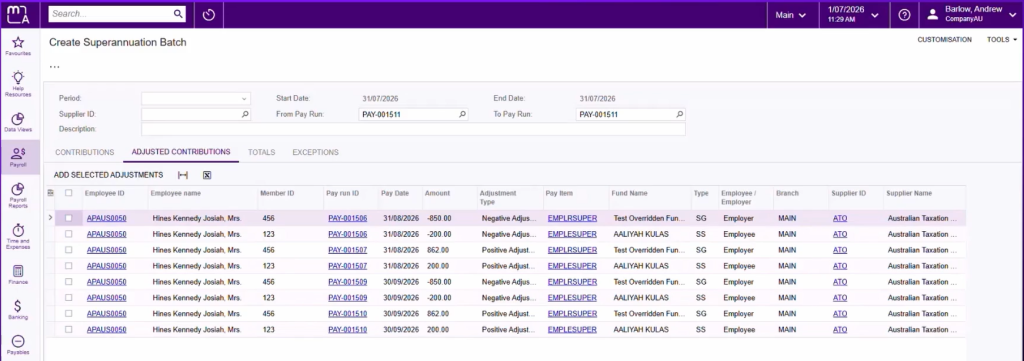
From 1 July 2026, every Australian employer must pay superannuation on every payday. Contributions must reach the employee’s super account within seven business days. This is the ATO’s Payday Super reform and it applies to every employer regardless of size or industry.
MYOB Acumatica 25R2 prepares your payroll for these changes end to end:
- Qualifying Earnings (QE): Super is now calculated on QE, a new ATO term that replaces Ordinary Time Earnings (OTE). QE is reported through Single Touch Payroll on every pay run.
- Pay item configuration: A new qualifying earnings column appears in the pay item liabilities screen after the 25R2 update. Each pay item needs to be reviewed and classified correctly before 1 July.
- Maximum Contribution Base: The MCB moves from quarterly to annual. MYOB Acumatica’s online calculation engine applies this automatically from 1 July.
- Adjusted contributions: Corrections for underpaid or overpaid super are handled separately without disrupting the main pay run.
- Fund validation: Super fund validation confirms all funds are active before batch submission.
- Payment options: Submit via MYOB Pay Super or export to your preferred external clearing house.
Note: The ATO Small Business Superannuation Clearing House closes on 30 June 2026. If your business currently uses the SBSCH, you must transition to an alternative before that date.
New Clock App
A modernised time capture tool built for shift-based environments including retail, hospitality, healthcare and distribution. Employees clock in and out via tablet or browser using a PIN, with optional photo capture, location selection and shift feedback. Time data flows directly into Workforce Management and payroll with no manual re-entry.
Workforce Management Employee Benefits (Flare)
MYOB Acumatica Workforce Management now connects with Flare Employee Benefits, giving employees access to a curated benefits hub within the same app they already use for rosters, timesheets and payslips. Benefits include retail discounts, financial wellness offers and optional novated leasing.
3. Finance
Two focused enhancements in the Finance area, one for multi-jurisdiction tax compliance, one for faster financial report building.
Inclusive Tax Support for External Tax Providers
Businesses using Avalara or Vertex for tax calculation can now configure gross (inclusive) tax calculations in addition to the existing net tax method. The tax mode can be set at the provider level, per customer, per vendor or overridden within any individual document.
Redesigned ARM Report Builder
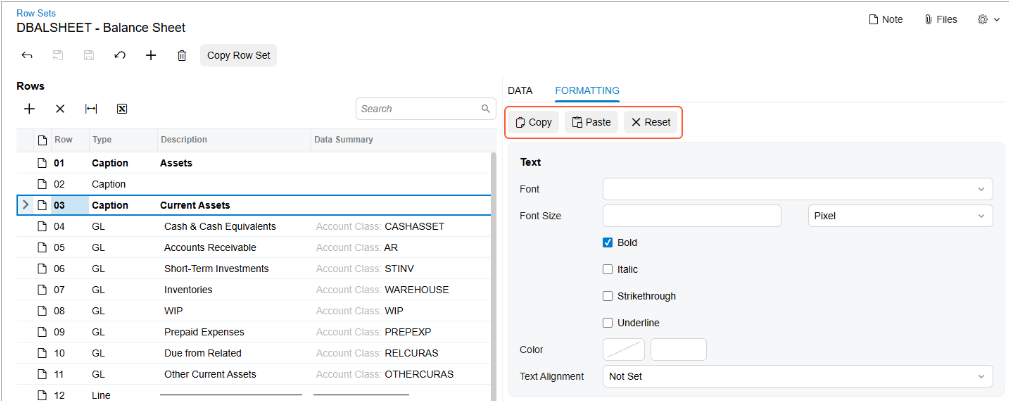
The Row Sets, Column Sets and Unit Sets forms used to build ARM reports have been fully rebuilt in Modern UI. Key improvements:
- Instant formatting preview: see how changes look before saving.
- Drag and drop row reordering: reorganise report structure visually.
- Copy and paste formatting: apply formatting consistently without repeating configuration.
- Automatic row renumbering: formula references update automatically when rows are added or moved.
Business Impact
For finance teams managing month-end board reports, budget vs actuals packs or multi-entity consolidated reports, these changes reduce build time and the risk of formula errors in complex ARM structures. Finance managers who spend hours on report formatting every month-end will feel this improvement immediately.
4. Sales and Customer
Three enhancements in 25R2 that improve the day-to-day efficiency of sales, account management and billing teams.
Redesigned CRM Tasks
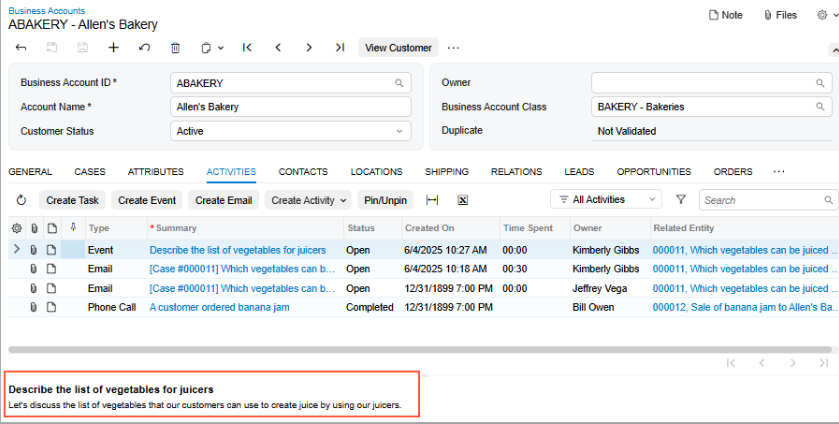
Task, Activity and Email Activity forms in the CRM have been rebuilt with a cleaner layout using tabbed sections and a quick summary preview panel. The redesign makes it faster to work through a high volume of CRM activities without losing context between tasks.
Vendor Support Cases
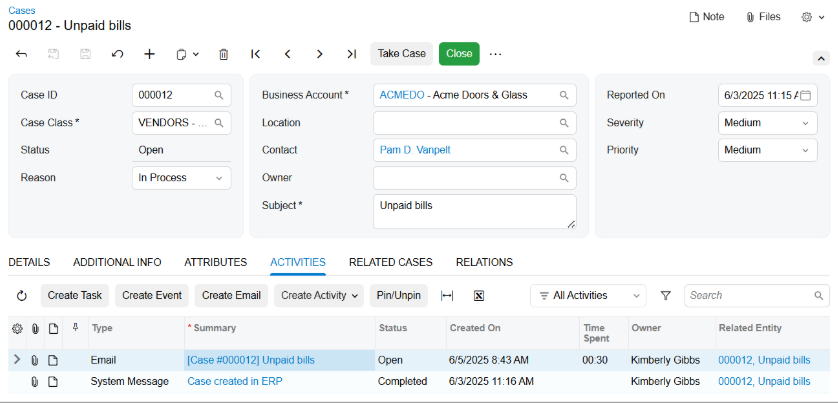
Support cases can now be created and managed against vendor accounts using the same CRM workflow used for customer cases. Vendor details auto-populate and a dedicated Cases tab shows all related cases in one place. Particularly useful for managing supplier disputes, delivery follow-ups and quality complaints.
Send Multiple Documents in One Email
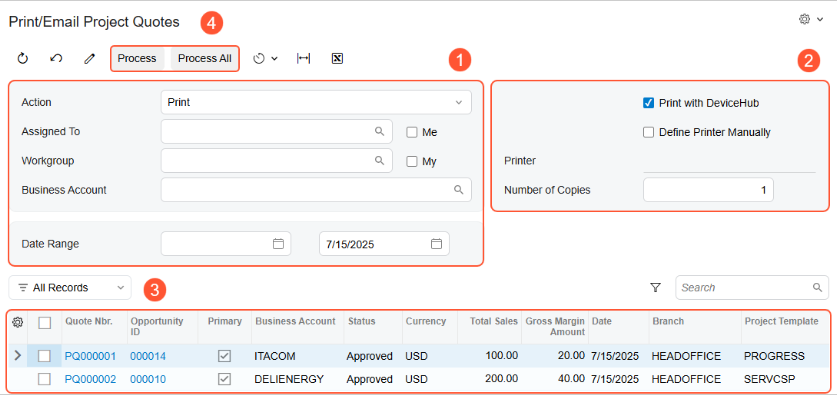
Multiple invoices, sales orders or quotes can now be selected and sent in a single email, either as separate attachments or merged into one PDF. The system automatically groups documents by customer. For businesses running end-of-month billing runs, this eliminates a significant volume of repetitive manual email sending.
5. Supply Chain
Four updates across the supply chain in 25R2, one AI-powered and three operational. Together they are the most substantial supply chain release in several cycles and directly address challenges faced by wholesale, distribution and multi-warehouse businesses.
Cross-Sell Assistant (AI)
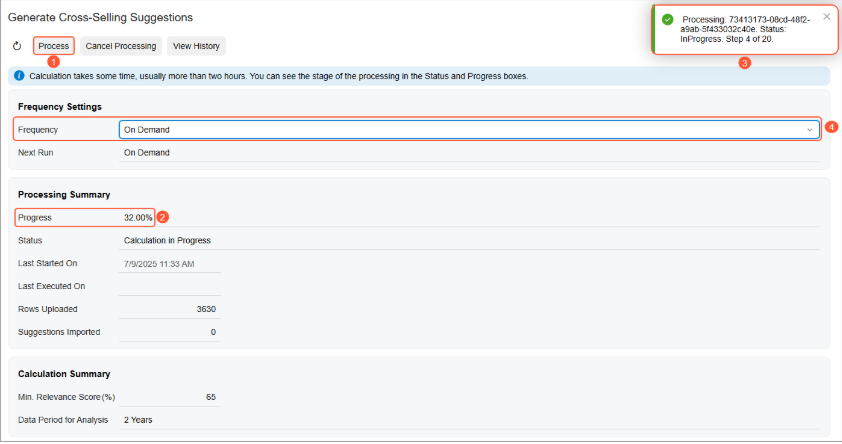
The Cross-Sell Assistant uses machine learning to analyse historical sales data and generate product pairing suggestions automatically, based on what customers actually buy together. Businesses can configure the lookback period, relevance threshold and number of suggestions per item. All pairings require approval before going live. Suggestions surface directly at the point of order entry and are included at no additional cost.
Business Impact
For a wholesale distributor processing 50 or more sales orders per day, surfacing relevant product pairing suggestions at the point of order entry can meaningfully increase average order value without additional sales effort. Businesses looking to grow revenue per transaction without adding headcount will find this is one of the highest-value features in the 25R2 release.
Order Orchestration
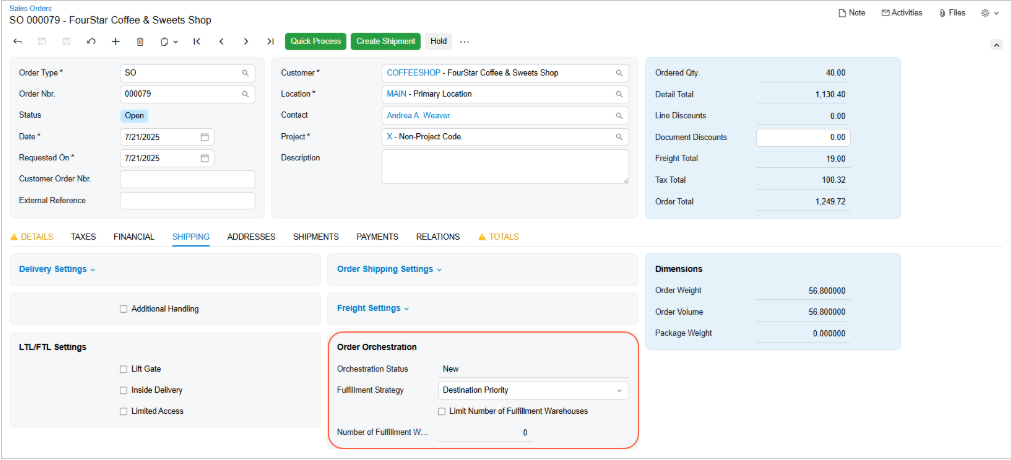
For businesses operating across multiple warehouses, Order Orchestration automatically selects the optimal fulfilment location for each sales order based on stock availability, the customer’s shipping address or predefined priority rules. This eliminates manual decision-making in multi-warehouse fulfilment and improves delivery accuracy without requiring a coordinator to make a call on every order.
Business Impact
A distribution business operating three or more warehouses can remove dozens of manual warehouse allocation decisions per day with Order Orchestration. The result is faster fulfilment, fewer picking errors and consistent delivery performance that does not depend on individual coordinator judgement.
Directed Put-Away for WMS
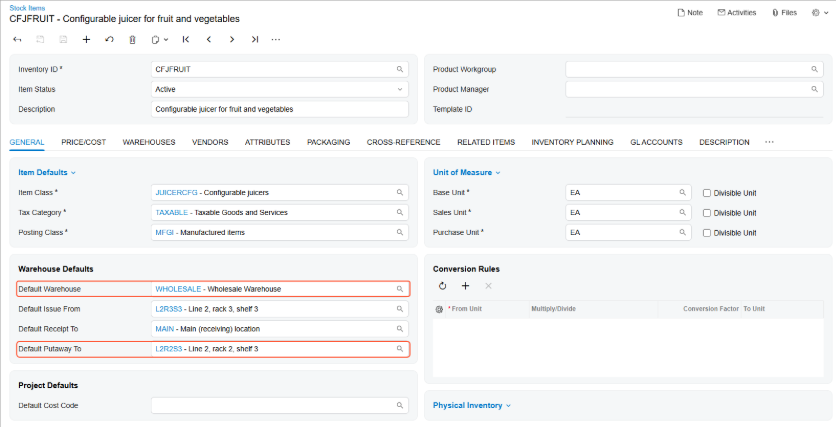
When a received item is scanned via the mobile app, the system automatically surfaces the correct put-away location. Workers no longer need to decide where stock belongs or refer to a separate reference system. This brings warehouse-grade precision into MYOB Acumatica natively and reduces misplaced inventory and picking delays.
Intercompany Drop Shipments
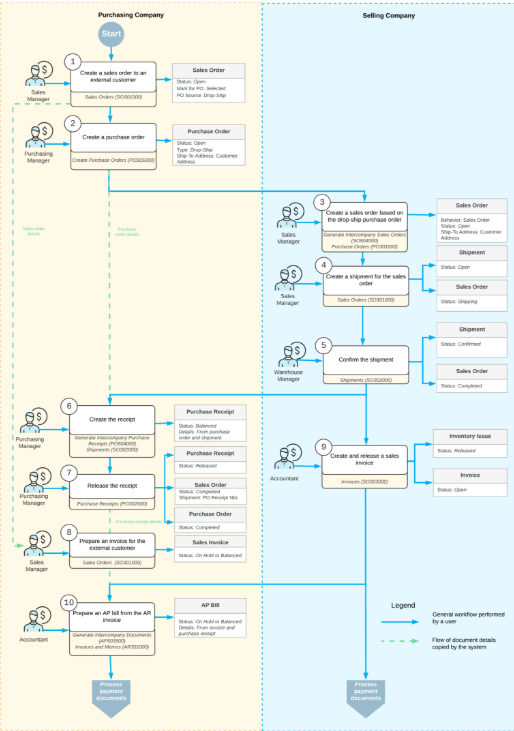
Businesses operating multiple entities within the same MYOB Acumatica tenant can now fulfil customer orders using stock from a sister company, shipped directly to the end customer. An intercompany sales order is generated automatically from the drop-ship purchase order, and all related financial documents are created across both entities without duplicate data entry.
6. Production
Four updates for manufacturers in 25R2, one AI-powered and three operational improvements driven by customer feedback on the limits of existing production tools.
Production Variance Anomaly Detection (AI)
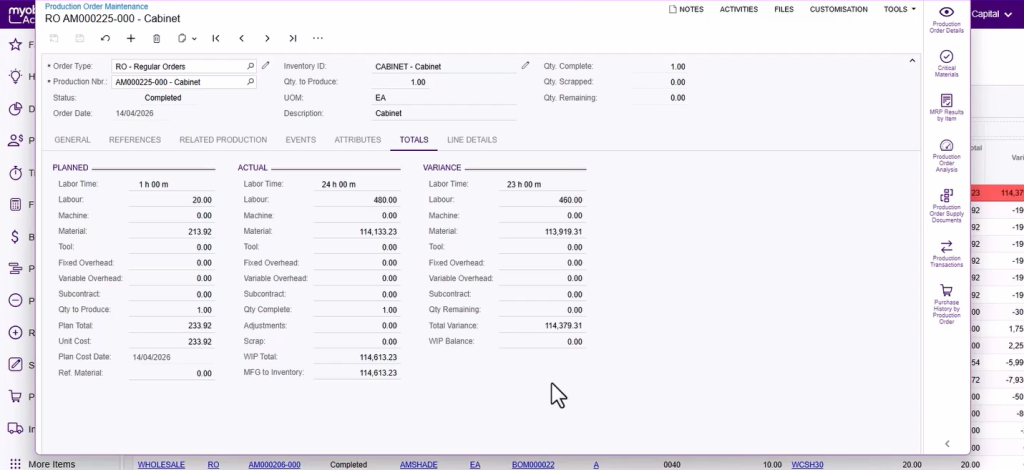
AI continuously monitors material costs, labour time, production totals and employee efficiency in the background. When it detects an unusual deviation, it flags the anomaly automatically without waiting for a manual report. Anomalies can be marked as reviewed with comments added for audit trail purposes.
Business Impact
An engineering manufacturer managing complex multi-level production runs can now catch a material cost blowout or labour efficiency issue as it develops rather than discovering it at month-end review. For manufacturers operating on tight margins, finding a variance early enough to act on it is the difference between a small correction and a significant write-off.
Production Order View
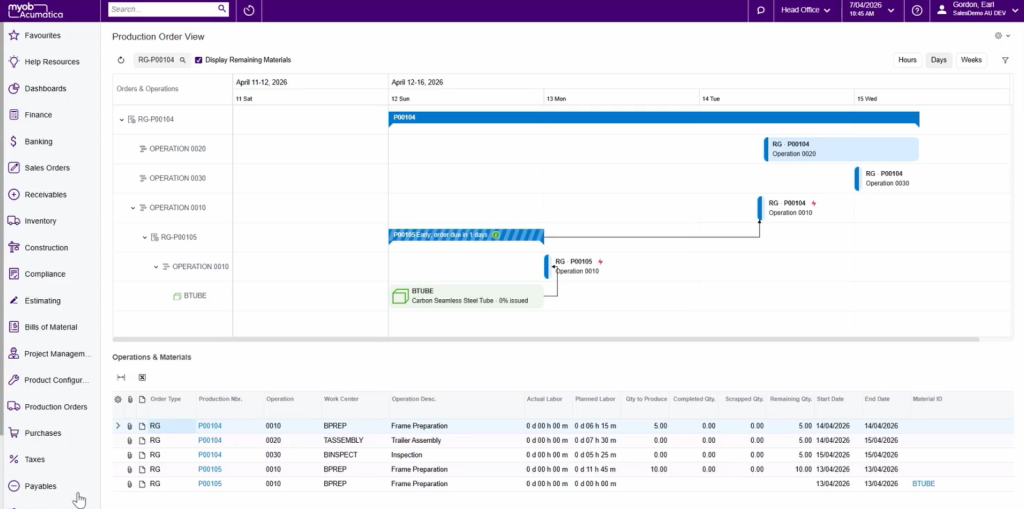
A new graphical Gantt-style view of material and scheduling status across every level of a production order, from the top-level order down through all sub-assemblies. Visual indicators show on-time, early and late status at a glance. Dependency arrows between operations make the production sequence clear. An operation-level detail panel in the lower section provides resource planning information without navigating away.
BOM Cost Rollup Improvements
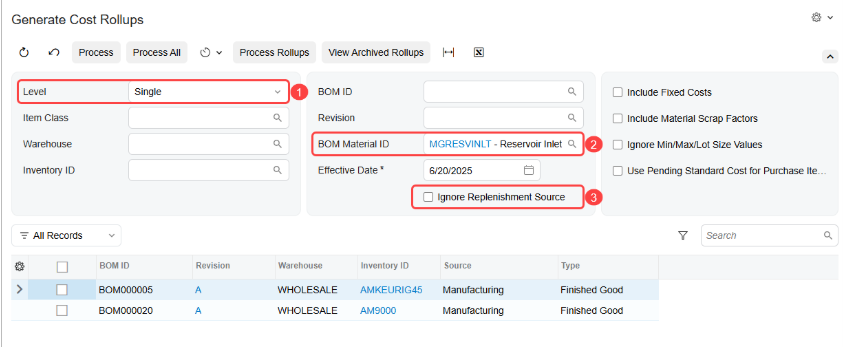
Cost rollup scenarios can now be modelled and compared without affecting live production data. Changes are only applied when the business is confident in the outcome. Automatic scheduling reduces the manual effort of running rollups regularly. For manufacturers using BOM cost rollups for pricing decisions, this removes a significant risk from the process for complex multi-level BOMs.
Lot and Serial Attribute Capture in Manufacturing
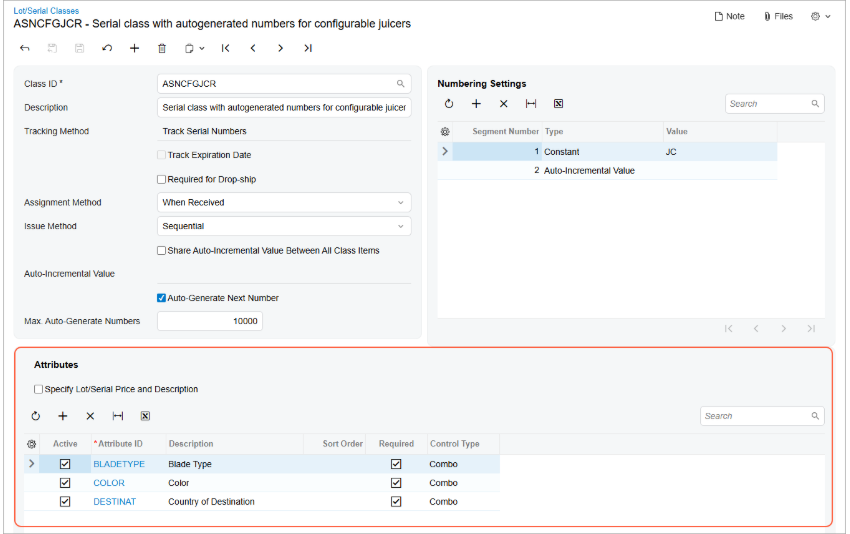
Attribute values for lot and serial tracked items can now be captured directly within manufacturing workflows, both when receiving finished goods into inventory and when issuing materials to production orders. This improves traceability for manufacturers in food and beverage, mining equipment, pharmaceutical, defence and electronics manufacturing where audit trail and quality control are part of the workflow.
7. Projects
Five enhancements for project-driven businesses in 25R2, spanning governance, mobile capability, document management and financial control. Particularly relevant for construction businesses, project management firms and professional services organisations.
Closed Project Status
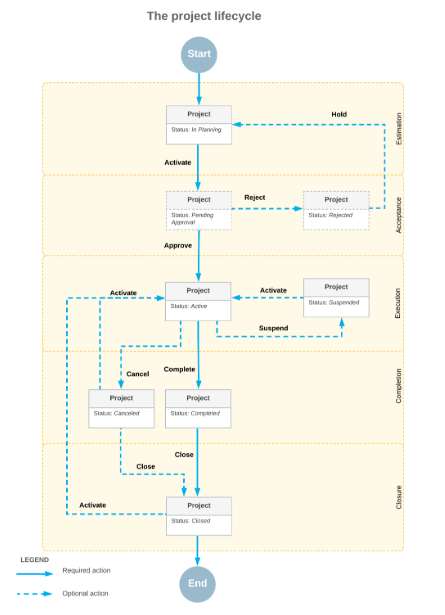
Projects can now be set to a Closed status, making them read-only and removing them from active lookups, billing runs and allocation processes. A project cannot be closed while unprocessed documents remain against it. Closed projects can be reactivated if work resumes. For businesses managing large numbers of concurrent and completed projects, this reduces accidental postings and cleans up active project lists significantly.
Predefined User Roles
New project-specific roles including PM Admin, PM Financial Controller, PM Operations Manager and PM Project Manager are available when assigning user access. This reduces manual configuration work for system administrators and helps keep sensitive financial data appropriately restricted without building custom permission sets from scratch.
Mobile App: Change Orders and Approvals
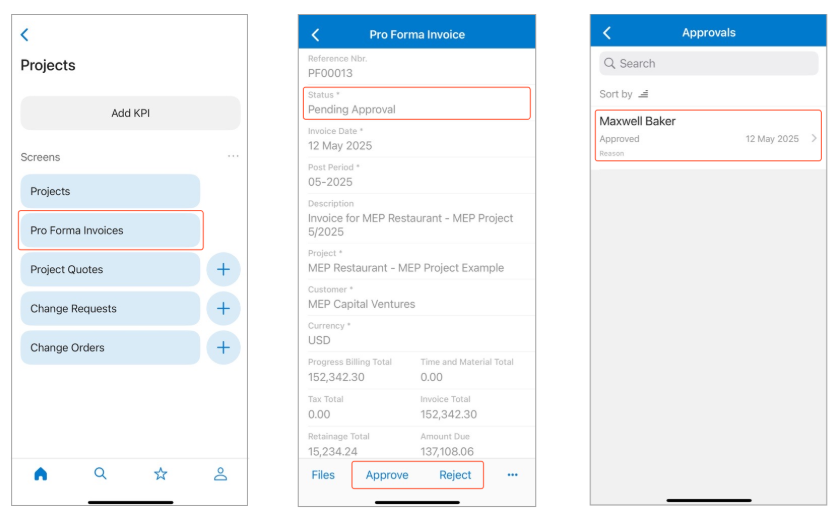
Change orders can now be created, reviewed and approved directly from the MYOB Acumatica mobile app on site. Proforma invoices can be approved or rejected with a single tap, with the option to attach notes, photos or videos.
Business Impact
A construction project manager or site supervisor can approve a variation order or proforma invoice from the job site without returning to the office or accessing a desktop browser. Work moves faster, the audit trail stays intact and head office no longer becomes a bottleneck for on-site decisions.
Document Management Enhancements
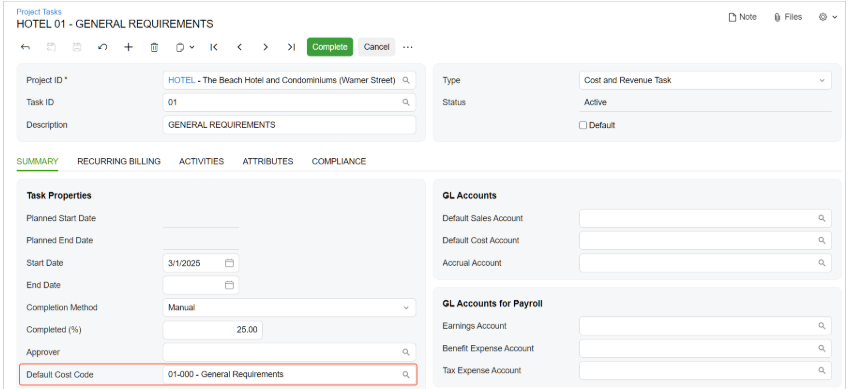
Centralised, searchable document storage within the project environment, with tagging, version control and real-time access for both office and field staff. Version control ensures teams are always working from the latest drawing, specification or contract revision.
One-Click Project Transaction Reversal
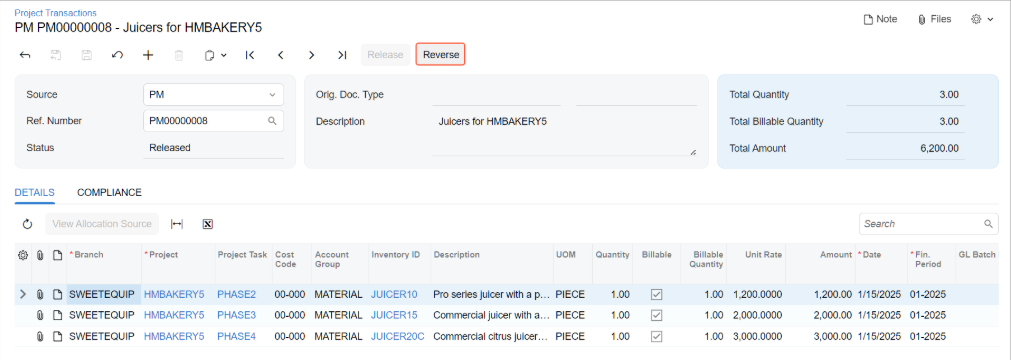
Project transactions can now be reversed directly from the Project Transactions form with a single click, rather than building a manual reversal transaction. This reduces the time needed to correct errors and simplifies the clean-up of historical project data.
8. Field Services
One major feature in Field Services for 25R2, but it is a rebuild, not an incremental update. The Modern Calendar Board replaces the existing scheduling calendar entirely.
Modern Calendar Board
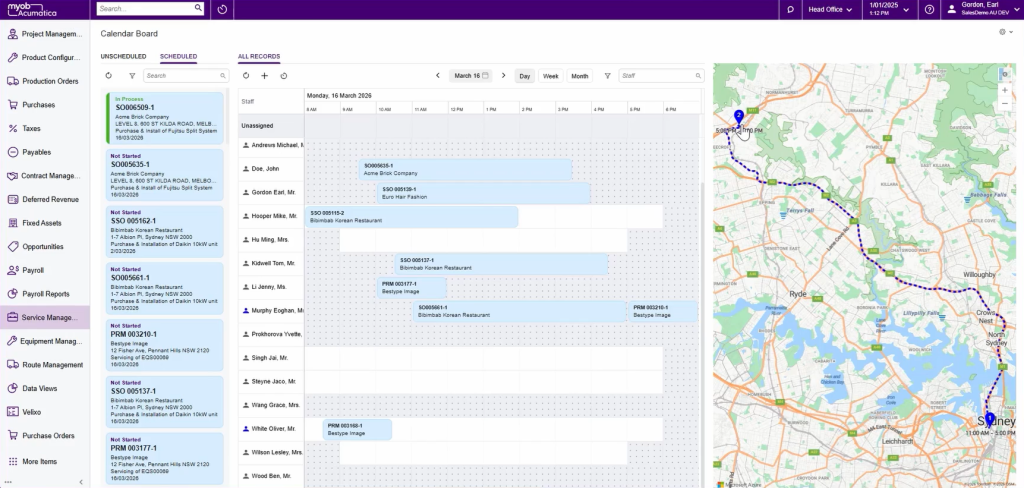
The Modern Calendar Board is a complete rebuild of the field services scheduling interface. The new calendar delivers:
- Drag and drop scheduling: assign and reschedule appointments without navigating away from the calendar view.
- Enhanced filtering and grouping: filter by skills, service areas, staff licences or other criteria to find the right person for a job quickly.
- Quick actions: perform common scheduling actions directly in the calendar without opening separate forms.
- Azure Maps integration (optional): view appointment locations on a map, see routes between jobs and track the real-time GPS location of field technicians via the mobile app.
- Smart assignments: schedule based on staff skills, licences and service area definitions.
Business Impact
For service businesses managing HVAC, electrical, plumbing, equipment maintenance or similar field operations, the Modern Calendar Board directly addresses the scheduling coordinator’s core daily workflow. Less clicking, better full-schedule visibility and the ability to react to same-day changes without losing track of the broader schedule.
Industry Highlights
MYOB also publishes industry-specific summaries for the 25R2 release. If you are in one of these sectors, the industry hub pages give you a focused view of what is most relevant.
Manufacturing
Production Variance Anomaly Detection, BOM Cost Rollup improvements and Lot and Serial Attribute capture in manufacturing workflows. Explore the Manufacturing 25R2 hub.
Construction
Closed Project Status, predefined user roles and mobile app enhancements for on-site change order management and proforma approvals. Explore the Construction 25R2 hub.
Wholesale and Distribution
AI-powered Cross-Sell Assistant, Order Orchestration for multi-warehouse fulfilment and Directed Put-Away for WMS. Explore the Wholesale and Distribution 25R2 hub.
What to Do Before You Upgrade to 25R2
25R2 is a significant release with a broad scope of changes. A few things to confirm before your upgrade:
- Modern UI: review your customisations and identify which screens need to be converted. Run these in a sandbox before applying to production. Classic UI retirement is planned for 26R2.
- Payday Super: if you are an Australian employer using MYOB Acumatica Payroll, apply the Payday Super configuration update and review all pay items against the new qualifying earnings definition before 1 July 2026.
- SBSCH: if you use the ATO Small Business Superannuation Clearing House, transition to MYOB Pay Super or an alternative before 30 June 2026.
- AI Studio: this is a Technology Preview in 25R2. Register your interest via the Release Hub if you want early access.
- Release notes: the full technical release notes are available at help.myob.com.au and cover all configuration and behavioural changes in detail.
- MYOB Academy: a dedicated 25R2 Stay Current course is available with step-by-step learning on every new feature.
Frequently Asked Questions
When will MYOB Acumatica 25R2 be available?
MYOB Acumatica 25R2 is available now. MYOB rolls out updates progressively to SaaS customers. If you are unsure whether your environment is on 25R2, check with your implementation partner or your MYOB account manager.
Should I upgrade to MYOB Acumatica 25R2 immediately?
For most businesses, yes. The Payday Super compliance changes are the most pressing reason. If you are an Australian employer using MYOB Acumatica Payroll, you need the 25R2 update to configure qualifying earnings before 1 July 2026. The Modern UI transition is also best started during the 25R2 parallel-run window rather than waiting until Classic UI retirement in 26R2.
Is MYOB Acumatica 25R2 compatible with existing customisations?
Standard screens are being progressively updated by MYOB. Custom screens built for Classic UI need to be reviewed and converted to work in Modern UI. MYOB provides a conversion tool as a starting point. Complex customisations typically require additional review and testing in a sandbox before migrating production users.
What happens to Classic UI?
Classic UI runs in parallel with Modern UI through the 25R2 release cycle. All new features from 25R2 forward are built exclusively for Modern UI. Classic UI will be fully retired in the 26R2 release. There is no opt-out from the retirement.
How does MYOB Acumatica handle Payday Super?
MYOB Acumatica 25R2 introduces a new qualifying earnings column in the pay item liabilities screen, automatic MCB threshold adjustment from 1 July, adjusted contributions management, fund validation services and integration with MYOB Pay Super for SuperStream-compliant submission. Read the full guide: Payday Super 2026: The Complete Guide for Australian Employers.
What is AI Studio in MYOB Acumatica?
AI Studio is a new capability in 25R2 that allows businesses to build AI-powered agents inside MYOB Acumatica using plain language, without writing code. Agents act on live ERP data within your existing role-based security controls. It is in Technology Preview in 25R2 and moves to full availability in 26R1. Data is hosted in Australian and New Zealand data centres and is never used to train external AI models.
Is MYOB Acumatica 25R2 included in my subscription?
Yes. MYOB Acumatica releases are included in the standard subscription for SaaS customers. There is no additional licence cost for 25R2 features, including the Cross-Sell Assistant and AI Studio Technology Preview. Some features may require configuration work from your implementation partner to activate.
What should AlphaBiz customers focus on first?
Based on what we are seeing across our customer base, we recommend prioritising three things: Payday Super configuration before 1 July, Modern UI transition planning before Classic UI retirement in 26R2, and a review of your customisations to understand conversion requirements. If you would like help with any of these, book a complimentary upgrade review with our team.
Book a complimentary MYOB Acumatica 25R2 Upgrade Review
AlphaBiz Solutions is a MYOB Acumatica implementation partner with offices in Perth and Sydney. We help mid-market Australian businesses plan and execute upgrades, configure new features correctly and get the most out of every release.